


Cashew—Expense Budget Tracker
4.7672.00 Reviews
App Specs
- Version
- 6.6.11
- Updated On
- License
- Free
- Downloads
- 500,000+
- Developer
- Dapper App Developer
- Categories
- Finance
- Platform
- Android
Screenshots

 Analysis by AppCompare
I usually notice a budgeting problem in small moments: a quick grocery stop, lunch bought between errands, or a subscription I forgot was still active. Each purchase seems harmless on its own, but together they can make a month feel harder to explain. Cashew—Expense Budget Tracker is aimed at that everyday gap between spending money and remembering where it went. I like the basic idea because it makes keeping track feel more approachable than building a spreadsheet from scratch.
A routine that works best when it stays simple
My most useful way to approach an expense tracker is to log a purchase while I still remember what it was. With Cashew, that means opening the app after a routine transaction, entering the amount, and choosing a category. The value is not in recording every detail perfectly; it is in making the habit easy enough to repeat. If I wait until the end of the week, small cash purchases and mixed shopping trips are much harder to reconstruct accurately.
A practical example is a grocery run that includes household supplies. I would record the total and decide whether splitting it across categories is worth the extra effort. If the main question is simply whether grocery spending is rising, one clear entry may be enough. If I am trying to understand household spending more closely, dividing the purchase can make the later review more useful. That trade-off—speed now versus detail later—is worth deciding in advance rather than handling differently every time.
Set a baseline before tightening the budget
When I first use a budgeting app, I resist setting ambitious limits immediately. A few weeks of honest tracking can show what my normal spending looks like, especially in categories that vary from week to week. Then I can set a limit that reflects my real habits instead of choosing a number that sounds disciplined but is impossible to maintain. Cashew’s category budgets and reminders can help make that process visible, but they work best when the categories match the way I actually think about money.
For instance, a broad “food” category may be easy to manage, while separating groceries from restaurant meals can reveal a pattern that a single total would hide. On the other hand, too many categories make every entry a small administrative task. I would start with the few distinctions that could change a decision—such as groceries, transport, and eating out—and add more only when I have a clear reason. The useful budget is the one I will keep using.
Settings and habits worth checking
At setup, I would take care to enter income, recurring expenses, and savings goals in a way that reflects how money actually arrives and leaves my account. A monthly salary is different from irregular freelance income, and a budget built around the wrong timing can look misleading even if every purchase is recorded correctly. It helps to settle on a consistent approach to shared bills, transfers, and refunds too. Otherwise, the same transaction can be counted in different ways from one month to the next.
Receipt attachments can be useful, but I would treat them as supporting notes rather than a substitute for a clean expense record. A receipt is most helpful when I know why I saved it: perhaps to check a work purchase, remember the details of a larger household expense, or review a return. For ordinary small purchases, attaching every slip can create more upkeep than insight. I would use the feature selectively so that saved receipts remain easy to find when I need them.
Worth Reading Before You Choose

EA SPORTS FC Mobile 26 Is a Bigger Football Game, but It Takes Time

Flipboard Shows What News Apps Must Do Beyond the Feed

Switching to Android Auto Means Rethinking Your Driving Routine

Google Calendar Makes a Crowded Week Easier to Manage

Ludo King Makes the Most of the Minutes Between Plans

Baby Panda World Brings Quick Play to Modern Phones, but Its Game Library Feels Busy
Before relying on reminders, I would also decide what I want them to do for me. A warning that a category is nearing its limit is useful if it prompts a practical choice, such as postponing a nonessential purchase. It is less helpful if I set limits so low that the app is constantly telling me I am over budget. I would make the first limits realistic, review them after a full spending cycle, and adjust only when the numbers point to a genuine change.
Make repeat tasks quicker without losing accuracy
Experienced users tend to benefit from a small, repeatable routine more than from entering elaborate notes. I would keep a consistent naming and categorizing habit, record purchases at a natural stopping point, and set aside a short weekly review to catch anything missed. That rhythm is more reliable than relying on memory at month’s end. If I share household costs with someone else, agreeing on who records which purchases can prevent duplicate entries and avoid a confusing total.
Another helpful pattern is to distinguish spending from moving money. A transfer between accounts is not the same as paying for a meal or a bill, and treating both as ordinary expenses can distort a spending review. I would check how I am recording these movements and apply the same rule each time. The same goes for refunds: recording them consistently makes category totals easier to interpret, especially when a return lands in a different month from the original purchase.
For receipts and larger purchases, a useful workflow is to record the expense first, then add a receipt only when it will answer a question later. That keeps daily logging quick while preserving context for unusual transactions. For budgets, I would check category progress before a planned discretionary purchase rather than waiting for a reminder after the fact. The app is most useful when it informs a decision, not when it becomes another place to inspect out of habit.
How it compares with familiar alternatives
Compared with a notes app or a basic spreadsheet, a dedicated expense tracker gives spending a clearer structure: categories, budgets, and reports sit together instead of being assembled by hand. A spreadsheet can still be a better fit for someone who wants complete control over formulas and custom analysis, or who enjoys maintaining a detailed financial model. Cashew makes more sense to me when I want a guided record of day-to-day spending without turning money management into a separate project.
It also serves a different purpose from a banking app. A bank’s transaction history can be convenient for checking card purchases, but it may not capture cash spending or the personal categories I want to use for a budget. A manual tracker asks me to do more work, yet that effort can make me notice purchases I would otherwise overlook. I would choose Cashew when active awareness is the goal; if I mainly want transactions gathered automatically with as little input as possible, a service centered on bank connections may suit me better.
What using Cashew feels like in practice
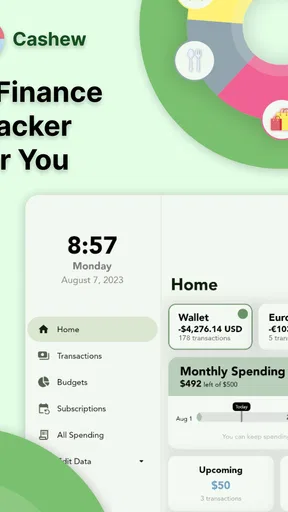
Opening Cashew—Expense Budget Tracker for the first time felt like a breath of fresh air. The interface is clean and user-friendly, which is a big plus for someone like me who doesn’t want to spend hours trying to figure things out. The colors are easy on the eyes, and the layout is intuitive, making navigation a breeze. I was up and running within minutes, which is saying something because, let's face it, financial apps can be daunting.
Getting Started
Setting up my account was straightforward. The app asked for the usual details: income, expenses, and savings goals. I appreciated how it didn’t bombard me with unnecessary questions—just the essentials to get started. Once the initial setup was done, it was time to dive into the features.
Cashew is a finance app from Dapper App Developer. It is free to install, although it offers in-app purchases, and its Everyone age rating makes it broadly accessible. Its current version is 5.4.4, with Android support starting at version 6.0. Those details make it easy to judge basic compatibility, but the bigger decision is whether I am comfortable entering expenses myself and maintaining a regular tracking habit.
Tracking Expenses
Let's talk about the bread and butter of the app—tracking expenses. Adding expenses is as simple as pie. A few taps, and you’re done. You can categorize each expense, which is super helpful for those end-of-month reviews to see where most of your cash is going. There’s also an option to attach receipts, a feature I found particularly handy during tax season.
A realistic day shows both the strength and the demand of manual tracking. I might buy coffee on the way to work, pick up lunch, then stop for groceries on the way home. Recording each purchase soon after it happens gives me a more dependable picture than trying to remember all three later. If I miss one, I can still add it during a review, but I should expect that older entries may be less precise. The tool helps organize what I enter; my routine determines how complete the record becomes.
Budgeting Made Easy
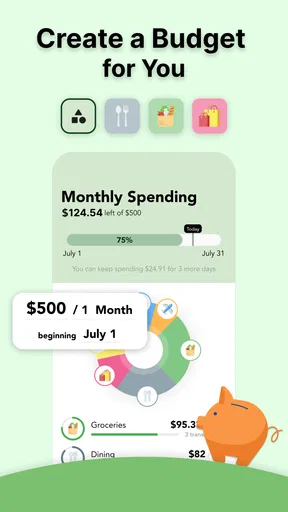
Now, I’ve always struggled with sticking to a budget, but this app makes it almost fun. You can set up different budgets for various categories like groceries, entertainment, and travel. The app sends friendly reminders when you’re getting close to your limits. It’s like having a personal financial coach cheering you on from the sidelines!
That encouragement has a limit: a reminder cannot decide whether an expense is necessary, and a budget does not create extra money. I would use the alert as a prompt to pause and check the remaining month, not as a reason to feel guilty about a normal purchase. If my circumstances change—perhaps I am travelling or paying an annual bill—I would interpret the category totals in that context rather than treating one unusual period as my new baseline.
Insights and Reports
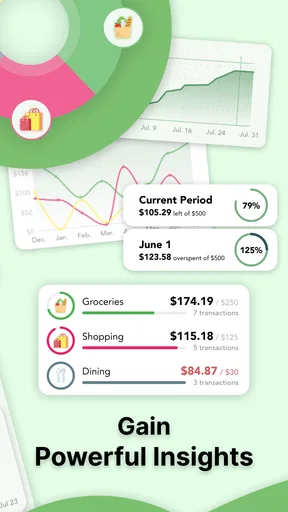
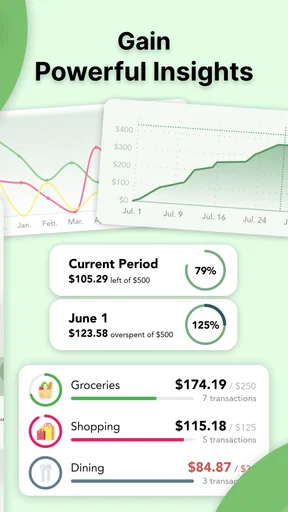
One of my favorite features is the insights section. The app generates detailed reports, offering a clear picture of your financial health. You can see trends, compare months, and even get suggestions on where to cut back. It’s a real eye-opener and has genuinely helped me make smarter financial decisions.
I get the most from reports when I bring a specific question to them: Did eating out increase compared with last month? Are small purchases adding up? Is a budget limit realistic? A report can point to a pattern, but I still need to decide what caused it and whether it matters. Comparing months is less meaningful when categories or logging habits changed halfway through, so consistency is more important than making every entry elaborate.
Security and Syncing
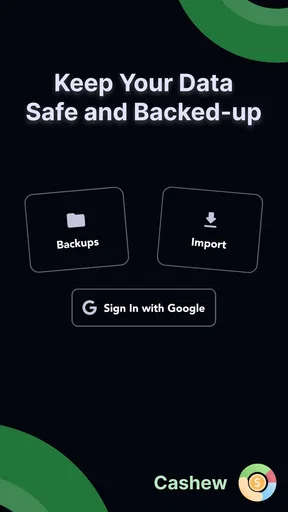
Let’s talk security because it's a biggie when dealing with financial data. The app uses bank-level encryption to keep your data safe, which gives me peace of mind. Plus, you can sync it across devices, so whether I'm on my phone or tablet, my financial info is always up-to-date.
Because spending records can reveal personal routines, I would still be thoughtful about which devices I use and who can access them. Syncing is convenient when I switch between a phone and tablet, but it also makes a consistent entry habit important: recording an expense on one device and later adding it again on another can create duplicates. I would check the record after switching devices rather than assuming that more than one screen automatically means a more accurate budget.
Who should choose it, and who might not
I think Cashew is a good match for someone who wants a hands-on view of spending, likes organizing purchases into categories, and is willing to enter transactions regularly. It can also suit people who want to move beyond a list of bank transactions and ask more useful questions about their own habits. With a 4.8 average from around 23,000 ratings and more than 500,000 installs, it has attracted plenty of users, though popularity alone does not tell me whether its manual approach fits a particular person.
I would look elsewhere if my main requirement were automatic importing, highly customized spreadsheet analysis, or a shared system built around a whole household’s complicated finances. Those needs call for tools designed around automation, deep customization, or collaboration. Cashew’s appeal is simpler: it puts expense entry, category budgets, receipts, and reports in one place. That is enough for many personal budgets, but it is not a replacement for accounting software or professional financial advice.
A few limits to keep in mind
The main trade-off is the attention that manual tracking requires. If I stop entering purchases for several days, the reports become less trustworthy, and no amount of tidy categories can fix missing transactions. Budget reminders can also feel noisy if I create too many categories or set limits without considering irregular expenses. I would rather maintain a small, useful structure than spend time perfecting a budget I rarely consult.
There is also a difference between tracking expenses and making a complete financial plan. Cashew can help me understand recorded spending and compare periods, but I still need to think separately about debt, savings priorities, upcoming bills, and the reasons behind a spending pattern. The app’s suggestions can be a starting point for reflection, not a substitute for personal judgement. If I only want a place to check my account balance, my bank’s app may be more direct.
Final Thoughts
After using Cashew—Expense Budget Tracker for a while, I can confidently say it’s a game-changer for anyone looking to take control of their finances. It’s not just about tracking expenses; it’s about understanding your spending habits and making informed decisions. If you’re someone who’s been looking for a way to manage your money without the hassle, give this app a shot. Trust me, your wallet will thank you!
My recommendation comes with one condition: treat it as a habit-building tool, not a magic fix. Start with a few clear categories, enter purchases consistently, and review the reports with a question in mind. If that approach sounds manageable, this finance app can make everyday spending easier to understand without demanding spreadsheet-level effort. If I wanted a fully automatic system or detailed accounting controls, I would choose a different kind of tool instead.
Pros
- Intuitive user interface.
- Real-time expense tracking.
- Customizable budget categories.
- Secure data encryption.
- Syncs across multiple devices.
Cons
- Limited features in free version.
- Occasional sync delays.
- No integrated bill reminders.
- Requires internet for full functionality.
- Lacks investment tracking features.
FAQs for Cashew—Expense Budget Tracker
What features does Cashew—Expense Budget Tracker offer?
Cashew—Expense Budget Tracker provides a comprehensive suite of tools for managing personal finances. Features include detailed expense tracking, customizable budget categories, and visual reporting through charts and graphs. Users can also sync their data across multiple devices and set financial goals. The app aims to simplify budgeting and improve financial awareness.
Is Cashew—Expense Budget Tracker free to use?
Cashew offers a free version with essential features for basic expense tracking and budgeting. However, to unlock premium features such as advanced reporting, multi-device synchronization, and personalized financial advice, users may need to subscribe to a paid plan. The app provides in-app purchases for these additional features.
How secure is my data with Cashew—Expense Budget Tracker?
Cashew prioritizes user data security by employing encryption and secure servers to protect sensitive information. The app does not store bank account details and requires user consent for any data sharing. Regular updates ensure compliance with the latest security standards, providing peace of mind for users concerned about privacy.
Can I use Cashew—Expense Budget Tracker offline?
Yes, Cashew allows users to input and categorize expenses offline. Once an internet connection is restored, the app seamlessly syncs data across devices. This feature ensures users can continue tracking their finances without interruption, even in areas with limited connectivity.
Does Cashew—Expense Budget Tracker support multiple currencies?
Cashew supports multiple currencies, making it ideal for users who travel frequently or manage finances in different countries. The app automatically converts expenses into the user’s primary currency based on current exchange rates, ensuring accurate budgeting and financial tracking regardless of location.


